

Salesforce Integration Pack for System Center Orchestrator
Connect Salesforce to Microsoft System Center Orchestrator with Kelverion and automate the customer data, service requests and business process workflows that keep your organisation moving.
Salesforce is a cloud-based customer relationship management platform that helps organisations manage customer data, sales opportunities, service cases, marketing engagement and business workflows in one connected environment. It gives sales, service, marketing, commerce and IT teams a shared view of customers, helping them improve collaboration, personalise interactions and act faster on customer needs.
For many businesses, Salesforce becomes a central source of customer and account information. However, customer data and operational processes rarely live in Salesforce alone. Service desks, monitoring tools, fulfilment systems, asset databases and back-office platforms all need to exchange information with Salesforce so teams can deliver accurate, timely and consistent customer service.
Typical Automation Scenarios
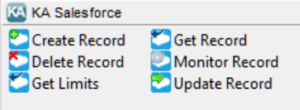
- Customer Data Synchronisation
Keep account, contact, case or custom object information consistent between Salesforce and service management, asset, reporting or operational systems - Service Request Fulfilment
Detect new or changed Salesforce records and trigger Orchestrator runbooks to provision services, route tasks, update systems or notify stakeholders - Case and Ticket Updates
Update Salesforce records automatically as work progresses in downstream tools, giving customer-facing teams accurate status information - Back-Office Workflow Automation
Use Salesforce events to initiate fulfilment, approval, remediation or reporting workflows across the wider IT estate - Operational Monitoring
Monitor Salesforce records for changes and trigger automation when a specific business condition is met - Governed API Usage
Retrieve Salesforce API limits so runbooks can make informed decisions and help avoid avoidable integration failures
Benefits at a Glance
- Automate Salesforce Processes From Orchestrator
Extend existing runbooks so Salesforce can trigger, update and participate in wider IT and business workflows - Reduce Manual Data Entry
Keep customer, case and operational information aligned across Salesforce and other enterprise systems - Improve Service Responsiveness
Forward customer requests to back-end systems and return near real-time status updates to improve visibility and customer satisfaction - Use Reusable Activities
Build automation faster with predefined Salesforce activities instead of creating and maintaining custom integration code - Protect Existing Orchestrator Investment
Add Salesforce automation to the System Center Orchestrator environment your team already knows and operates - Support More Reliable Integration
Use a supported Integration Pack designed to provide visibility, stability and control across Orchestrator automation
Key Capabilities
- Create Record
Insert new Salesforce records for supported object types - Get Record
Retrieve Salesforce records using object-specific filter criteria - Monitor Record
Detect newly created or updated Salesforce records and trigger runbook automation - Update Record
Modify existing Salesforce records as part of an automated workflow - Delete Record
Remove Salesforce records where appropriate and permitted - Get Limits
Retrieve API limit information for the Salesforce environment - Forms-Driven Configuration
Present relevant fields and properties based on the selected Salesforce object type, helping runbook authors configure activities more quickly and consistently
Integration Activities
| Activity Name | Description |
|---|---|
| Create-Record | Insert a new record of the specified object type |
| Delete-Record | Delete a record of the specified object type |
| Get-Limits | Retrieve Salesforce API limits for the environment |
| Get-Record | Retrieve record of the specified object type |
| Monitor-Records | Detect when new records are created and/or existing records are updated in the environment |
| Update-Record | Update an existing record of the specified object type |