

Oracle Integration Module for Azure Automation
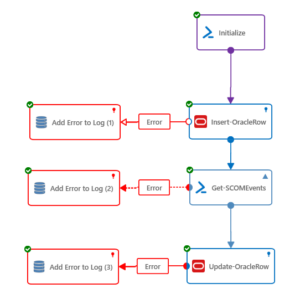
Connect Oracle to your automation strategy with low-code runbooks built in Kelverion Runbook Studio.
Oracle is a broad enterprise software, database, infrastructure, and cloud platform designed to help organisations store, manage, secure, analyse, and act on business data. Its portfolio includes Oracle Database, Oracle Cloud Infrastructure, enterprise applications, analytics, integration services, and industry solutions.
At the centre of many Oracle environments is Oracle Database: a powerful relational database management system used for high-volume transactions, operational systems, data warehousing, reporting, and mission-critical applications. Oracle solutions are commonly selected where performance, availability, security, scalability, and data integrity are essential.
Typical Automation Scenarios
- Service Request Fulfilment
Automate approved requests that require Oracle database lookups, updates, or record creation - User and Access Workflows
Trigger Oracle-related provisioning, validation, or entitlement checks as part of onboarding, offboarding, or access management processes - Operational Data Updates
Standardise repeatable database updates that support finance, HR, service management, reporting, or business application processes - Event-Driven Remediation
Use Azure Automation runbooks to respond to alerts, incidents, or scheduled checks that require Oracle data interaction - Reporting and Data Extraction
Retrieve Oracle data as part of automated reporting, dashboard population, reconciliation, or audit processes - Cross-System Orchestration
Combine Oracle actions with service desk, cloud, infrastructure, Microsoft 365, and other enterprise tools in a single governed runbook
Benefits at a Glance
- Build Oracle Runbooks Faster
Create Oracle database automation in Runbook Studio using graphical activities rather than hand-coding every database interaction - Reduce SQL and Scripting Dependency
Automatically build and execute the required Oracle commands without requiring users to write or fully understand SQL - Improve Accuracy and Consistency
Automatically map table columns to inputs, filters, and published data to reduce manual configuration errors - Control Runbook Design
Prevent avoidable mistakes by controlling access to read-only fields, enforcing mandatory inputs, and providing value browsers for common data types - Reuse Secure Database Connections
Create Smart Connections to one or more Oracle databases, including multiple connections to the same database where different security privileges are required - Extend Azure Automation Value
Bring Oracle processes into the same automation strategy used for cloud, infrastructure, service desk, Microsoft 365, and operational workflows - Enable Wider Team Participation
Help both coders and non-coders contribute to automation through Runbook Studio’s low-code graphical authoring environment
Key Capabilities
- Smart discovery of Oracle databases, structures, tables, columns, and properties
- Automatic generation and execution of Oracle commands from runbook activities
- Graphical mapping of table columns to inputs, filters, and published data items
- Reusable Smart Connections for one or multiple Oracle databases
- Support for different security contexts through separate database connections
- Guided configuration to reduce runbook design errors and enforce required values
- Designed for use with Azure Automation and Kelverion Runbook Studio
Integration Activities
| Activity Name | Description |
|---|---|
| Delete-OracleRow | Delete rows from a database table |
| Insert-OracleRow | Insert a row into a database table |
| Invoke-OracleProcedure | Run a stored procedure |
| Invoke-OracleCommand | Run a script containing SQL statements supported by Oracle |
| Select-OracleRow | Select rows from a database table using easy-to-use filters |
| Update-OracleRow | Update rows in a database table |