

Microsoft Dynamics 365 Integration Pack for System Center Orchestrator
Bring Microsoft Dynamics 365 into your automated IT operations with Kelverion.
Microsoft Dynamics 365 is a suite of cloud-based, AI-powered business applications that brings together customer relationship management and enterprise resource planning capabilities. Organisations use Dynamics 365 to manage sales, customer service, field service, finance, supply chain, operations and customer insights in a connected platform that works with Microsoft 365, Power Platform and Azure.
By connecting data, teams and processes, Dynamics 365 helps organisations improve customer engagement, streamline workflows, automate repetitive business processes and make faster decisions using real-time insights and embedded intelligence.
By connecting data, teams and processes, Dynamics 365 helps organisations improve customer engagement, streamline workflows, automate repetitive business processes and make faster decisions using real-time insights and embedded intelligence.
Typical Automation Scenarios
- Customer Data Synchronisation
Keep customer records, service information and related business data up to date across Dynamics 365 and operational systems - Case-Driven Automation
Monitor new or updated Dynamics 365 records and trigger runbooks to diagnose, remediate or fulfil requests - Service Management Integration
Connect Dynamics 365 service activity with ITSM, monitoring, CMDB, asset, identity or provisioning systems - Direct Customer Interactions
Route customer requests from Dynamics 365 to backend systems and return progress updates to improve visibility and satisfaction - DevOps and Business Process Automation
Use Dynamics 365 events to initiate automated workflows that span IT operations, application delivery and business teams - Attachment Handling
Create and retrieve attachments linked to Dynamics 365 note records as part of automated service or customer processes
Benefits at a Glance
- Extend Existing Orchestrator Investment
Add Dynamics 365 automation to established runbooks and operational processes without replacing your automation platform - Reduce Manual Service Desk Effort
Automate repetitive tasks such as creating records, updating cases, retrieving customer data and synchronising information across systems - Improve Data Consistency
Keep customer, case and service information aligned between Dynamics 365 and other enterprise systems - Accelerate Request Fulfilment
Forward customer requests to backend systems and provide near real-time status feedback to Dynamics 365 users - Connect CRM With IT Operations
Link customer-facing processes with infrastructure, service management and DevOps automation - Lower Integration Complexity
Use prebuilt Orchestrator activities instead of developing and maintaining custom connectors for common Dynamics 365 operations
Key Capabilities
- Create, get, update and delete Dynamics 365 entity records from Orchestrator runbooks
- Monitor Dynamics 365 records to detect newly created or updated items
- Execute entity-specific requests, such as resolving a case
- Create and retrieve attachments associated with Dynamics 365 note records
- Use reusable Orchestrator activities to standardise Dynamics 365 automation across teams
- Support automation scenarios for Microsoft Dynamics 365 Online subscriptions
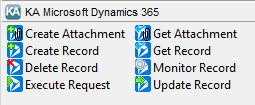
Integration Activities
| Activity Name | Description |
|---|---|
| Create-Attachment | Create a new Note enity record and attach a document |
| Create-Record | Inset a new entity record |
| Delete-Record | Delete an entitiy record |
| Execute-Request | Perform specific entity operations |
| Cancel-Case | Cancel a case which is active |
| Check-StateTransition | Check if the current state of a case allows it to be resolved |
| Get-TotalTime | Calculate total time, in minuetes, worked on a case |
| Reactivate-Case | Reactivate a previously cancelled case |
| Resolve-Case | Resolve an active case |
| Get-Attachment | Retrieve an attachment for the specified Note entity record |
| Get-Record | Retrieve existing entity records |
| Monitor-Record | Detect when new records are created and/or when existing records are updated |
| Update-Record | Update existing entitiy records |