

Kelverion Integration Module for VMware vSphere
Automate VMware vSphere with confidence from Azure Automation and Kelverion Runbook Studio. The Kelverion Integration Module for VMware vSphere gives automation teams a faster, simpler way to build reliable runbooks for virtual infrastructure operations without needing to hand-code every vSphere interaction in PowerShell.
VMware vSphere is a leading server virtualization platform used to create, run, manage, monitor, and secure virtual machines across modern data center environments. Built around core components such as the ESXi hypervisor and vCenter Server, vSphere helps IT teams pool compute, storage, and networking resources so they can deliver flexible, resilient, and scalable infrastructure services.
For many organizations, vSphere remains central to hybrid IT operations. It supports the day-to-day management of virtual machines, hosts, clusters, datastores, snapshots, migrations, and workload availability, making it a critical platform for service delivery, infrastructure operations, and automation-led transformation.
Typical Automation Scenarios
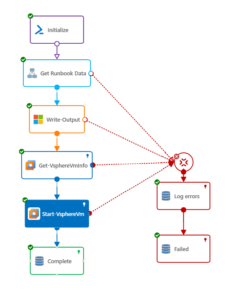
- Automated VM Provisioning
Create new virtual machines from approved templates in response to service requests, onboarding workflows, or capacity triggers - VM Lifecycle Management
Start, stop, restart, suspend, remove, or retire virtual machines as part of standardised operational processes - Resource Movement and Optimization
Move VMs between folders, hosts, datastores, resource pools, or data centers to support maintenance, balancing, or operational change - Snapshot Management
Create and remove VM snapshots as part of controlled change, patching, testing, backup, or rollback workflows - Device and Configuration Updates
Add or retrieve VM device details, update custom attributes, or apply configuration changes through controlled automation - Service Desk Automation
Connect service request workflows to vSphere actions so common infrastructure tasks can be fulfilled faster and more consistently - Hybrid IT Orchestration
Combine VMware vSphere actions with Azure, ITSM, monitoring, and notification systems to automate end-to-end processes across the enterprise
Benefits at a Glance
- Accelerate Runbook Delivery
Use prebuilt VMware vSphere activities to automate common infrastructure tasks faster than scripting each interaction from the ground up - Reduce PowerShell Dependency
Configure vSphere automation through forms-driven activities, helping more team members contribute to automation without deep scripting expertise - Simplify vSphere Configuration
Smart discovery identifies available vSphere objects such as datastores, clusters, hosts, and virtual machines, reducing manual lookup and configuration effort - Improve Consistency and Governance
Standardise virtual machine operations through reusable runbooks that can be reviewed, versioned, released, and executed through Azure Automation - Bridge Cloud and On-Premises Operations
Orchestrate VMware vSphere tasks from Azure Automation while using Runbook Studio as a low-code design experience for hybrid infrastructure automation - Support Scalable Operations
Create reusable Smart Connections to one or more vSphere instances, enabling automation across multiple environments where required
Key Capabilities
- Ready-built VMware vSphere activities for Azure Automation and Kelverion Runbook Studio
- Forms-driven configuration for vSphere interactions without writing PowerShell code
- Smart Discovery of vSphere inventory, including datastores, clusters, hosts, virtual machines, and related properties
- Automatic mapping of vSphere properties to runbook inputs, filters, and published data
- Smart Connections for reusable links between Runbook Studio and one or more vSphere instances
- Activities for common vSphere operations, including creating, moving, starting, stopping, restarting, suspending, updating, and removing virtual machines
- Support for snapshot, device, object, guest OS, status, and custom attribute operations
- Designed to support low-code automation authoring while generating runbooks that run through Microsoft Azure Automation
Integration Activities
| Activity Name | Description |
|---|---|
| Add-VsphereVmDevice | Adds a new device to an existing VM |
| Get-VsphereCustomAttribute | Retrieves custom attributes for a VM or host and returns the results as a sequence of PSObject instances |
| Get-VsphereObject | Retrieves vSphere objects of a specified type (VM, host, datastore, etc.) and returns the results as a sequence of PSObject instances |
| Get-VsphereVmDevice | Retrieves VM device information for a specific VM and returns the results as a sequence of PSObject instances |
| Get-VsphereVmInfo | Retrieves additional Guest OS or status information for a specific VM |
| Get-VsphereVmSnapshot | Retrieves VM snapshots |
| Move-VsphereVm | Moves a VM to another folder/datastore/resource pool |
| New-VsphereVm | Creates a new VM based on a specified VM template |
| New-VsphereVmSnapshot | Creates a new VM snapshot |
| Remove-VsphereVm | Removes an existing VM from inventory or deletes it permanently |
| Remove-VsphereVmSnapshot | Removes VM snapshots |
| Restart-VsphereVm | Restarts a running VM |
| Set-VsphereCustomAttribute | Sets a VM or host custom attribute |
| Set-VsphereVm | Modifies the properties and/or devices of an existing VM |
| Start-VsphereVm | Starts a VM |
| Stop-VsphereVm | Stops a VM |
| Suspend-VsphereVm | Suspends a VM |