

SolarWinds NPM Integration Pack for Microsoft System Center Orchestrator
Automate SolarWinds Network Performance Monitor processes directly from Microsoft System Center Orchestrator with a compliant Kelverion Integration Pack built for reliable IT operations automation.
SolarWinds Network Performance Monitor, often referred to as SolarWinds NPM, is network performance monitoring software designed to help IT teams detect, diagnose and resolve network performance issues before they affect users or critical services. It provides visibility across multi-vendor, on-premises and hybrid network environments, helping teams monitor availability, performance, latency, packet loss, bandwidth utilisation, device health and network paths from central dashboards.
With automated discovery, dynamic topology mapping, intelligent alerting and performance analysis capabilities, SolarWinds NPM gives network operations teams the insight they need to understand what is happening across routers, switches, firewalls, wireless infrastructure and other monitored network devices.
Typical Automation Scenarios
 Automated Alert Diagnostics
Monitor for new SolarWinds alerts, gather node and trigger object details, check recent alert history and launch first-line diagnostic steps- Incident Ticket Creation
Create or update incidents in a service management platform when critical SolarWinds alerts occur - Manager of Managers Workflows
Consolidate SolarWinds events with other monitoring tools into a central operational process or event management workflow - Maintenance Window Automation
Suppress alerts, unmanage nodes, resume alerts or re-enable node management as part of planned maintenance runbooks - Automated Escalation
Route high-priority alerts to the right team, notify stakeholders and attach relevant SolarWinds context to the workflow - Configuration Enrichment
Retrieve node information and custom properties to enrich downstream automation, reporting or service desk records
Benefits at a Glance
- Accelerate Runbook Development
Use pre-built SolarWinds activities rather than creating custom integrations from scratch - Improve Operational Response
Trigger diagnostics, remediation or ticketing workflows automatically when SolarWinds alerts are created or updated - Reduce Manual Effort
Automate common network operations tasks such as acknowledging alerts, suppressing alerts, managing nodes and updating custom properties - Create a Single Automation Layer
Use Orchestrator to connect SolarWinds NPM with ITSM, messaging, infrastructure and reporting systems - Increase Consistency and Control
Standardise how teams respond to network events with repeatable, auditable runbooks - Support Proactive Service Management
Combine SolarWinds monitoring data with Orchestrator automation to reduce delays between detection, diagnosis and action
Key Capabilities
- Monitor SolarWinds alerts and alert history for new or changed records
- Get alert details, alert history, node details, trigger object details and suppression records
- Acknowledge, unacknowledge, clear, suppress, unsuppress and resume alerts
- Set alert notes and update SolarWinds custom properties
- Manage node availability by placing nodes into an unmanaged state and resuming management after maintenance
- Use SolarWinds event and node data as inputs for wider Orchestrator runbooks
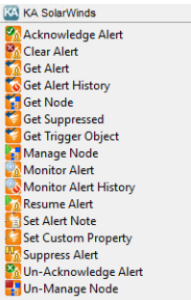
Integration Activities
| Activity Name | Description |
|---|---|
| Add-Poller | Add pollers to an existing SolarWinds object in a SolarWinds environment |
| Acknowledge-Alert | Acknowledge an alert after it has been triggered |
| Clear-Alert | Clear an alert without running the normal reset actions |
| Create-Node | Add new nodes in the environment |
| Delete-Nodes | Delete an existing SolarWinds node |
| Get-Alert | Retrieve and filter alters that have triggered in the environment |
| Get-AlertHistory | Retrieve and filter alert history from the environment |
| Get-Engine | Retrieve and filter engine records from the environment |
| Get-Node | Retrieve and filter nodes that have been discovered in the environment |
| Get-Poller | Retrieve and filter poller records from the environment |
| Get-TriggerObject | Retrieve more infomation about the object that triggered the alert |
| Get-Suppressed | Retrieved and filter alert suppression records |
| Manage-Node | Re-enable node management for a node after it has been un-managed |
| Monitor-Alert | Detect when new alerts that have triggered in the environment |
| Monitor-AlertHistory | Detect when new alert history records have been generated in the environment |
| Remove-Poller | Delete an existing poller |
| Resume-Alert | Un-suppress perviously suppressed alerts |
| Set-AlertNote | Set an alert note without acknowledging the alert |
| Set-CustomProperty | Set custom property values for various entities |
| Suppress-AlertActivity | Suppress alerts for a specified entity |
| Un-Acknowledge-Alert | Un-acknowledge a prevously acknowledged alert |
| Un-Manage-Node | Place a node in an un-managed stated for maintenance purposes |
| Update-Node | Update an existing node |