

Azure DevOps Integration Module for Azure Automation and Runbook Studio
Bring development, service management and IT automation closer together with the Kelverion Integration Module for Azure DevOps. Designed for Azure Automation and Kelverion Runbook Studio customers, the module provides ready-built, forms-driven activities that make it easier to create, retrieve, update and manage Azure DevOps work items without writing custom PowerShell.
Azure DevOps is Microsoft’s suite of modern development services for planning work, collaborating on code, building and testing applications, managing packages and delivering software through continuous integration and continuous delivery. Teams can use the full platform or adopt individual services such as Azure Boards, Azure Repos, Azure Pipelines, Azure Test Plans and Azure Artifacts to support the way they already work.
For IT operations, service desk and automation teams, Azure DevOps is often the system of record for bugs, tasks, change requests, product backlog items and development work. Integrating it with operational automation helps ensure that incidents, requests and infrastructure events can be tracked through to development action, remediation and release.
Typical Automation Scenarios
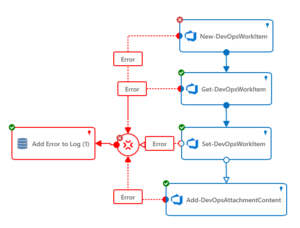
- Automated Application Fault Reporting
Create Azure DevOps bugs or work items when monitoring tools detect application faults or failed services - Service Desk to Development Synchronisation
Raise a development issue from a service desk incident, then keep the service desk updated as the work item changes state - Change and Release Tracking
Link operational runbooks to Azure DevOps work items so changes, remediation tasks and release activities have an auditable trail - Incident Remediation Follow-up
Automatically create tasks for recurring issues, failed runbook actions or infrastructure events that require developer investigation - DevOps Reporting and Governance
Retrieve and update work items as part of wider automation flows, enabling clearer reporting across operations and development teams
Benefits at a Glance
- Accelerate Runbook Design
Build Azure DevOps automation faster using ready-made activities instead of hand-coded PowerShell and custom REST API logic. - Reduce Complexity
Smart Discovery surfaces projects, work item types, fields and values directly inside Runbook Studio, helping both coders and non-coders configure reliable automation. - Improve Supportability
Standardised activities make runbooks easier to understand, maintain and hand over across IT operations and automation teams. - Reduce Errors
The module helps control read-only fields, enforce mandatory inputs and present value browsers for common data types. - Bridge IT and Development Workflows
Connect service desk, monitoring, remediation and DevOps processes so operational issues can flow smoothly into development tracking. - Reuse Secure Connections
Smart Connections provide reusable links to Azure DevOps or TFS instances, including support for multiple instances or different security contexts.
Key Capabilities
- Ready-built activities for Azure DevOps and Microsoft TFS automation
- Forms-driven configuration for creating, retrieving, updating and managing work items
- Smart Discovery of projects, work item types, fields and values in Runbook Studio
- Automatic mapping of work item fields to input properties, filters and published data items
- Reusable Smart Connections for one or more Azure DevOps or TFS instances
- Support for low-code runbook authoring in Azure Automation through Kelverion Runbook Studio
- Reduced need for specialist knowledge of Azure DevOps API calls, field names or PowerShell scripting
Integration Activities
| Activity Name | Description |
|---|---|
| Add-DevOpsAttachmentContent | Upload attachment content to a work item |
| Get-DevOpsAttachmentContent | Get-DevOpsAttachmentContent Download an attachment from a work item |
| Get-DevOpsAttachmentInfo | Get attachment information |
| Get-DevOpsWorkItem | Get a work item |
| New-DevOpsWorkItem | Create a new work item |
| Remove-DevOpsAttachment | Remove-DevOpsAttachment Remove an attachment from a work item |
| Remove-DevOpsWorkItem | Delete a work item |
| Set-DevOpsWorkItem | Update a work item |