

Integration Pack for Citrix Virtual Apps & Desktops
Automate Citrix Virtual Apps & Desktops provisioning and management directly from Microsoft System Center Orchestrator Kelverion.
Citrix Virtual Apps & Desktops is an application and desktop virtualisation platform that enables organisations to deliver Windows, Linux, web and SaaS applications, plus full virtual desktops, to users on almost any device. It gives IT teams centralised control over virtual machines, applications, licensing, security and access while allowing users to work securely from the office, at home or on the move.
By centralising application and desktop delivery, Citrix Virtual Apps & Desktops helps administrators manage the user workspace from the data centre or cloud, broker connections, optimise sessions, control access and scale resources according to business demand. It is widely used where secure remote access, consistent user experience and simplified management of virtual desktop infrastructure are essential.
Typical Automation Scenarios
- Automated VDI Provisioning
Create virtual desktop resources in Citrix Virtual Apps & Desktops in response to approved service requests, onboarding workflows or capacity triggers - Automated Scaling and Resource Recovery
Provision or de-allocate VDI resources based on demand, helping organisations optimise capacity and licence usage - Self-Service Session Support
Enable approved users or service desk teams to reset locked VDI sessions through controlled automation - Citrix Environment Management
Automate routine administration tasks across Citrix resources as part of wider infrastructure and service management runbooks - Hybrid IT Workflow Orchestration
Connect Citrix actions with ITSM, monitoring, identity, messaging or reporting processes already automated in Orchestrator
Benefits at a Glance
- Automate Repeatable Citrix Operations
Replace manual provisioning, de-allocation and management steps with consistent Orchestrator runbooks - Accelerate Service Request Fulfilment
Trigger Citrix VDI creation and management tasks directly from service requests or self-service processes - Improve Resource Utilisation
De-allocate unused VDI resources to reclaim assets and licences for reuse - Reduce Service Desk Effort
Automate the retirement, shutdown, or decommissioning of EC2 resources to help stop unnecessary billing and reclaim reusable resources - Automate Complex Cloud Tasks
Automate common support actions, such as resetting locked VDI sessions, to remove repetitive manual work - Standardise Operational Processes
Use reusable activities and runbook logic to enforce consistent procedures across Citrix environments - Extend Existing Orchestrator Investments
Add Citrix automation to the organisation’s existing System Center Orchestrator platform and integrate it into broader IT workflows
Key Capabilities
- Compliant Integration Pack for Microsoft System Center Orchestrator
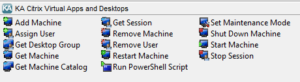
- Predefined activities for Citrix Virtual Apps & Desktops provisioning and management
- Automation support for VDI resource creation, management and de-allocation
- Run PowerShell Script activity for executing Citrix Virtual Apps & Desktops PowerShell actions
- Reusable activities designed to simplify runbook creation and reduce custom scripting effort
- Support for operational scenarios such as automated provisioning, resource reclamation and self-service session reset
Integration Activities
| Activity Name | Description |
|---|---|
| Add-Machine | Add a virtual machine to a Machine Catalogue or a Desktop (Delivery) Group |
| Assign-User | Assign a user to a Private (Static) Desktop or Shared (Random) Delivery Group or a Machine |
| Get-DesktopGroup | Return Desktop (Delivery) Groups |
| Get-Machine | Retrieve infomation about Virtual Apps and Desktop Machines; including both private and shared desktops |
| Get-MachineCatalogue | Return Virtual Apps and Desktops Machine Catalogues |
| Get-Session | Return running desktop sessions |
| Remove-Machine | Remove a machine from a Machine Catalouge or a Desktop (Delivery) Group |
| Remove-User | Remove a user from a Private (Static) Desktop or Shared (Random) Delivery Group or Machine |
| Restart-Machine | Restart a running machine |
| Run-PowershellScript | Run Virtual Apps and Desktop specific Powershell commands |
| Set-MaintenanceMode | Enable or disable maintenance mode for a Virtual Apps and Desktops machine |
| ShutDown-Machine | Shut down a running machine |
| Start-Machine | Start a machine |
| Stop-Session | Stop (loggoff) a running desktop session |