

Data Manipulation for Azure Automation and Runbook Studio
Turn complex automation data into clean, usable information. The Kelverion Integration Module for Data Manipulation helps Azure Automation and Runbook Studio customers parse, transform, convert and compose structured and unstructured data without rebuilding every conversion in native PowerShell.
Data Manipulation is the process of preparing data so it can be used reliably inside an automation workflow. In practical runbook terms, it means extracting values from incoming text, XML, CSV, JSON or HTML; converting one format into another; applying transformations; and composing output messages, files or payloads for downstream systems.
For automation teams, this matters because real-world systems rarely exchange information in the exact format a runbook needs. Service desks, monitoring platforms, ITSM tools, databases, APIs and legacy applications all produce data differently. Effective Data Manipulation bridges that gap by turning raw input into structured, actionable automation data.
Typical Automation Scenarios
- Service Request Automation
Parse request form data, extract key values and generate structured payloads for fulfilment runbooks - Incident and Alert Processing
Transform monitoring alerts into standardised ticket data for ITSM platforms - Orchestrator-to-Azure Migration
Convert established data manipulation configurations into Azure Automation-ready activities - API Payload Preparation
Convert XML to JSON, JSON to XML or compose formatted messages for external systems - Reporting and Notification Workflows
Build HTML, XML or text outputs for emails, reports, dashboards and downstream automation steps - Data Extraction From Legacy Systems
Parse embedded values from text, XML, CSV or HTML returned by older tools and applications
Benefits at a Glance
- Reduce Runbook Build Time
Use pre-built activities for common parsing, conversion and composition tasks instead of writing custom PowerShell for every format - Improve Supportability
Standardised data manipulation activities make runbooks easier to understand, maintain and troubleshoot - Support Cloud Migration
Reuse established Orchestrator data manipulation logic when moving automation workloads into Azure Automation - Enable Low-Code Automation
Combine the module with Runbook Studio to give teams a graphical, drag-and-drop way to design data-driven automation - Increase Data Reliability
Convert raw text and structured payloads into consistent outputs that can be passed cleanly between runbook activities - Integrate More Systems
Prepare and reshape data from service desks, monitoring tools, databases, APIs and legacy applications so it can be consumed by Azure Automation workflows
Key Capabilities
- Parse text, XML, HTML and other structured content to publish extracted values for use in runbooks.
- Compose XML, HTML or text structures from runbook inputs and automation data.
- Convert XML to JSON and JSON to XML to support modern API and integration requirements.
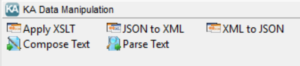
- Apply XSLT transformations to convert XML from one structure into another.
- Work with Azure Automation published data so transformed values can be passed between activities.
- Integrate with Runbook Studio for graphical, low-code runbook authoring and easier module use.
Integration Activities
| Activity Name | Description |
|---|---|
| Apply-Xslt | Used in a runbook to apply an XSL transformation on input XML |
| Compose-Text | Used in a runbook to compose text (xml, html or text) from the specified inputs |
| Convert-XmlToJson | Used in a runbook to convert XML text into JSON text |
| Convert-JsonToXml | Used in a runbook to convert JSON formatted text into XML |
| Parse-Text | Used in a runbook to parse a text (xml, html or text) |