
VMware vSphere Automation for System Center Orchestrator
Automate VMware vSphere processes directly from Microsoft System Center Orchestrator with the Kelverion Integration Pack for VMware vSphere. Provision, manage, update and retire virtual machines using robust, form-driven activities designed to make vSphere automation faster, more consistent and easier to support.
VMware vSphere helps organisations run and manage virtual machines across data center and cloud environments by pooling compute, storage and networking resources. For teams that depend on System Center Orchestrator, the challenge is turning those vSphere operations into reliable, repeatable runbook automation without creating unnecessary scripting complexity
Typical Automation Scenarios
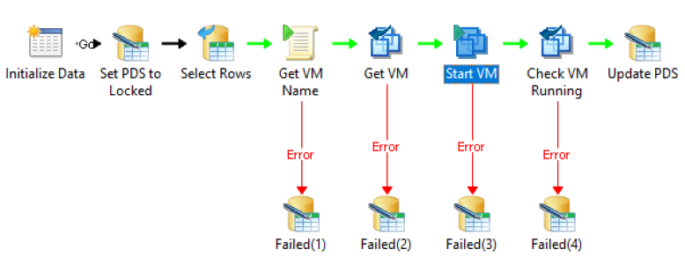
- Provision new virtual machines, including creation from existing templates
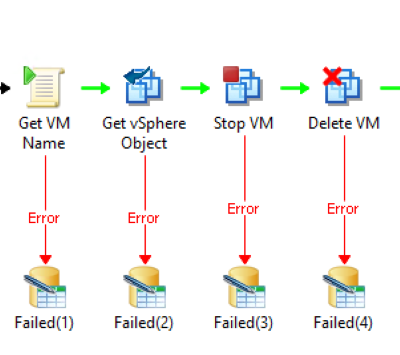
- Start, stop, restart, suspend, update, move and delete VMs from Orchestrator runbooks
- Add devices and update virtual machine properties as part of automated service delivery
- Retrieve vSphere object information to drive decisions and conditional logic in runbooks
- Set custom attributes for better tracking, governance and downstream automation
- Run VMware PowerCLI scripts when deeper vSphere automation is required
- Embed vSphere actions into service desk, approval, scaling, maintenance and retirement workflows
Benefits at a Glance
- Accelerate service delivery:
Automate common vSphere tasks from approved runbooks and reduce manual hand-offs - Improve operational consistency:
Use repeatable activities to standardise how virtual machines are provisioned, updated and retired - Reduce custom scripting effort:
Build automation faster with pre-defined activities while retaining scripting flexibility where it adds value - Strengthen governance:
Automate retirement, deletion, movement and attribute updates to help control resources and reclaim capacity - Integrate with ITSM processes:
Trigger vSphere actions from service requests, approvals, incident response and operational workflows - Extend your Orchestrator investment:
Keep System Center Orchestrator at the center of your automation strategy while connecting it to modern VMware vSphere environments
Whether you are automating VM provisioning, scaling resources, improving service desk fulfilment or retiring unused infrastructure, the Kelverion Integration Pack for VMware vSphere helps your team deliver faster, more controlled automation through the Orchestrator platform you already use
Key Capabilities
- Accelerate VM provisioning
Rapidly deploy VMware vSphere virtual machines from templates through automated Microsoft System Center Orchestrator workflows - Automate the complete VM lifecycle
Provision, power, update, migrate, scale and retire virtual machines with end-to-end orchestration - Make smarter automation decisions
Access live vSphere infrastructure data to drive intelligent, context-aware runbooks - Simply VM configuration management
Automate changes to CPU, memory, storage, networking and virtual devices without manual intervention - Strengthen governance and compliance
Apply custom attributes for improved asset tracking, ownership, reporting and policy enforcement - Extend automation with PowerCLI
Execute custom VMware PowerCLI and vRealise Operations Manager scripts for advanced infrastructure and operations automation - Reduce scripting, increase productivity
Build reliable, forms-driven automation faster with pre-configured Orchestrator activities - Integrate with IT service workflows
Embed vSphere automation into service requests, approvals, incident response, provisioning and lifecycle management - Protect your automation investment
Support modern VMware vSphere environments while leveraging existing Microsoft System Center Orchestrator deployments
Integration Activities
| Activity Name | Description |
|---|---|
| Add VM Device | Add new device to an existing VM |
| Create VM | Configure and create a new VM |
| Create VM From Template | Create a new VM based on an existing VM template |
| Delete VM | Permanently delete a VM from a Datastore or to remove a VM from the inventory |
| Get vSphere Object | Retrieve information about various objects in vSphere |
| Move VM | Move a VM to another Folder, resource pool, datastore, host or datacenter |
| Restart VM | Reboot the Guest OS (soft restart) or VM power will be reset (hard restart) |
| Run vSphere Script | Run a PowerCLI script in your vSphere environment |
| Run vROps Script | Run a PowerCLI script in your vRealize Operation Manager environment |
| Set Custom Attribute | Set a custom attribute value for a VM or host |
| Start VM | Start a stopped or suspended VM |
| Stop VM | Stop a running or suspended VM |
| Suspend VM | Suspend a running VM |
| Update VM | Update properties or device properties of an existing VM |